After yesterday’s event, Apple launched the final version of iOS 12.2 update to the general public. Here’s how you can download and install it on your iPhone, iPad, and iPod.
WHAT’S NEW IN IOS 12.2?
Unlike its predecessors, iOS 12.2 is a monumental update and brings a lot of new features as well as enhancements and bug fixes.
Its build number is 16E227 and being a final release, iOS 12.2 weighs 2.81GB on almost all compatible devices.
AIRPLAY 2 AND APPLE TV REMOTE
iOS 12.2 adds smart TV compatibility to AirPlay 2. Smart television sets from LG, Sony, Samsung, and Vizio can now interact with Apple devices.

From now on, compatible devices will be able to receive content from an iPhone, iPad, and iPod touch, and Mac without requiring Apple TV. Furthermore, Samsung users will now get access to the native iTunes store.
HEY SIRI ON AIRPODS 2
With the launch of the AirPods 2 this week, iOS 12.2 (final) enables compatibility with these new headphones. Now, you can also configure “Hey Siri” on them from an iOS device.
The process stays pretty much the same as on the iPhone, where you have to repeat certain phrases in order to help Siri recognize you.

In addition to adding AirPods 2, iOS 12.2 is the version with which the new iPad mini and iPad Air will come as standard to its users.
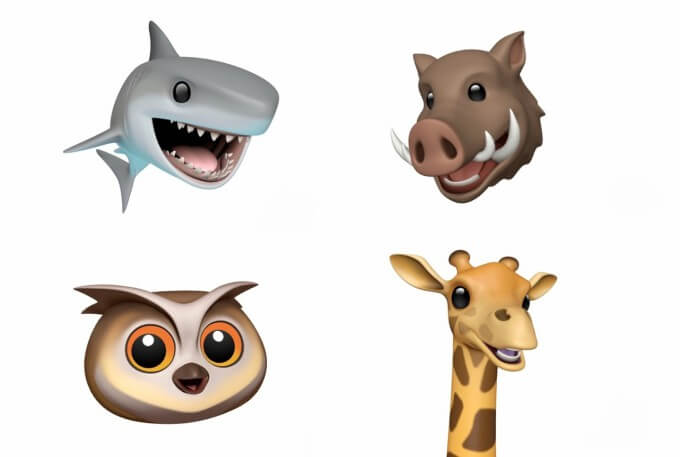
NEW ANIMAL ANIMOJIS
The stock collection of Animojis – animated emojis – gains new animals, namely – owl, wild boar, giraffe, and shark.
APPLE NEWS REDESIGN AND CANADA ADDITION
Apple News gains support for a new country – Canada. This version also brings a redesigned app and icon.
OTHER ENHANCEMENTS AND IMPROVEMENTS
Apart from the aforementioned features, Apple has also added quite a few enhancements and bug fixes to the iOS operating system.
ENHANCED MAPS APP
Users can now view the air quality of a specific area.
SAFARI
The browser will now display the “Not secure” message when you visit a website lacking a secure HTTPS certificate asks you to enter credit card details.
Safari now also has an option to control the privacy of websites that want to access accelerometer and gyroscope data for augmented reality features. iOS 12.2 also add intelligent tracking prevention for websites.
SUBSCRIPTIONS
It is now easier than ever to access and manage your subscriptions on the App Store.
VOICE NOTES
Improvements in the quality of voice notes sent in the Messages app. The voice notes will now have better quality as compared to those on older versions.
APPLE TV REMOTE
Apple TV Remote interface now has a new icon for controlling Apple TV and a new UI.
WALLET
You can now check Apple Pay’s transaction data.
SETTINGS
About section (Settings > General > About) will now display all the information pertaining to your device as well as the warranty data.
A section in settings will allow us to check the TVs compatible with AirPlay 2.
IOS 12.2 DOWNLOAD
IPHONE
iPhone SE, iPhone 5s
iPhone 6s, iPhone 6
iPhone 6s Plus, iPhone 6 Plus
iPhone 8, iPhone 7
iPhone 8 Plus, iPhone 7 Plus
iPhone X
iPhone XS
iPhone XS Max
iPhone XR
IPAD
iPad Air, iPad mini 2
iPad mini 4, iPad Air 2, iPad mini 3
iPad (5th generation), iPad (6th generation)
iPad Pro (9.7‑inch)
iPad Pro (12.9‑inch)
iPad Pro (10.5-inch), iPad Pro (12.9-inch) (2nd generation)
iPad Pro (11-inch), iPad Pro (12.9-inch) (3rd generation)
IPOD
iPod touch (6th generation)
SHOULD YOU UPGRADE?
Yes, you should definitely upgrade your compatible iPhone, iPad, and iPod to iOS 12.2. The latest update is a major step-up from its predecessors and, of course, warrants a prompt update.
And for those users who wish to purchase the newly-released AirPods 2, this update is mandatory.
All things considered, this version is not jailbreak-friendly. Jailbreakers, as always, should stay on the lowest firmware version possible.
Also Read:jihosoft Free iPhone Data Recovery
Sponsor ads:
Gihosoft Free iPhone Data Recovery:https://www.gihosoft.com/iphone-data-recovery-free.html
Gihosoft iPhone Data Recovery Free
Free iPhone Data Recovery Software for Windows/Mac
Recover up to 12+ types of files, including contacts, SMS, photos, WhatsApp, Viber, notes, etc.
Restore lost data from iOS devices directly or from iTunes and iCloud backup
Recover iPhone data lost due to iOS upgrade/jailbreak, accidental deletion, device lost or broken
Support all the latest iPhone, iPad and iPod Touch
Both Free and Pro version.
If you lost data after you updated to a new iPhone, you can always use Gihosoft iPhone Data Recovery to get the data back from the old iPhone or backup.You may also like: iphonerecovery.com
Also Read:Update Android
Also Read:Top 8 Best Alternative Websites to TamilGun in 2019


No comments:
Post a Comment